code-intelligence
Custom Request Parameters
The Custom params... dialog lets you attach provider-specific JSON to an API connection.
This is useful when a provider supports request fields that do not have a dedicated setting in the Eclipse preferences UI. For Ollama, this includes parameters such as num_ctx, top_k, and top_p.
Where to find it
Open Window -> Preferences -> Code Intelligence and click Custom params....
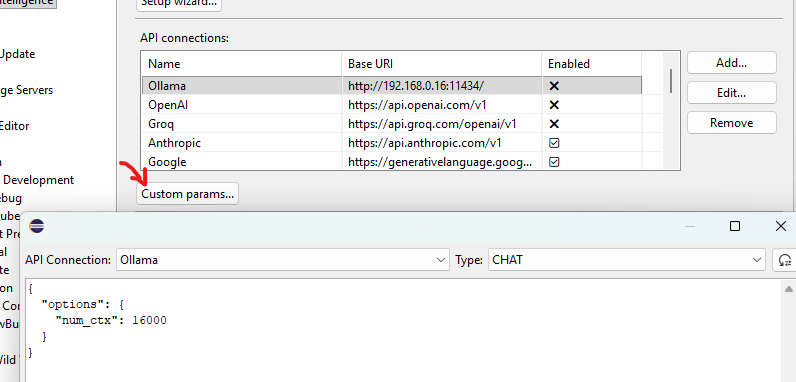
The dialog stores JSON per:
- API connection
- request type:
CHATfor chat conversations,INSTRUCTfor completion-style requests
The JSON format depends on the API you use. The plugin does not translate parameter names between providers, so the payload must match the request format expected by that provider.
Currently, the dialog is available for:
- Ollama
- OpenAI-compatible connections
- OpenAI Responses
- Anthropic
- Gemini
- X.ai
How parameters are applied
Custom params are used as a request preset for the selected connection and request type.
After loading that preset, the plugin adds the required request fields for the current operation, such as the model name, messages, and streaming mode. Some additional fields are only filled in when they are missing.
In practice, that means:
- Custom params are best used for optional provider-specific tuning fields.
- Required protocol fields controlled by the plugin are not meant to be overridden.
- If the plugin later sets a field explicitly, the plugin value wins.
- If the plugin only supplies a default when a field is missing, your custom value is kept.
Ollama
For Ollama, tuning parameters such as context and sampling settings belong inside the options object.
Increase the context window
Use this to override Ollama’s default context size:
{
  "options": {
    "num_ctx": 16000
  }
}
Adjust sampling
Example:
{
  "options": {
    "top_k": 20,
    "top_p": 0.9
  }
}
top_klimits sampling to the topkcandidates.top_penables nucleus sampling and keeps tokens whose cumulative probability stays withinp.
Combined example
{
  "options": {
    "num_ctx": 16000,
    "top_k": 20,
    "top_p": 0.9
  }
}
If you want the same settings for both chat and completion requests, configure both CHAT and INSTRUCT.
For the full list of Ollama request parameters, see the official Ollama API documentation.
Anthropic reasoning
The chat settings own Anthropic reasoning parameters. Claude 3.x and Claude 4.0–4.5 use the fixed token budget. Newer and unlisted Anthropic models use adaptive thinking and the shared effort selector: Model default (high), Low, Medium, High, XHigh, or Max. Do not set thinking or output_config.effort as custom parameters, because the chat settings apply them for the selected model.
Tips
- Start with
Reset to Defaultif you want a provider-specific template. - Use
{}to keep the provider defaults. - Clear the editor if you want to remove the custom params for the currently selected connection and type.
- Use valid JSON that matches the provider’s API.